
iOS Mobile App
Role
UX Researcher
Information Architect
UI Designer
Applications
Sketch
Invision
Adobe Creative Cloud
Duration
6 Months


"Bridging the gap between student athletes and college coaches."
Problem Area
According to the NCAA website, nearly eight million students currently participate in high school athletics in the United States. More than 480,000 compete in NCAA athletics*.
As a high school student athlete it was difficult to keep track of my statistics and my academic and athletic achievements for the sports I played. It was also a challenge to send that information to future colleges I would have liked to play for. This project explores how to make this process easier for high school student athletes looking to play sports on a collegiate level. It also explores how the process of recruiting high school student athletes can be easier for college recruiters.
*http://www.ncaa.org/about/resources/research/estimated-probability-competing-college-athletics
"My goal is to bridge the gap between student athletes and college coaches to make the collegiate sport recruiting process easier and engaging."

Empathize
Understanding the problem is key to finding the solution.
Competitive Analysis
To start to understand a bit about the problem area I was working in, I completed a competitive analysis of other apps and sites that completed similar objectives. I was able to look at the pros and cons of current products out there.

User Interviews
Screener surveys were conducted to find five target users. The screener surveys were handed out at a local high school. After the surveys were completed and the five target users were chosen, 30 minute user interviews were conducted. The target users were high school student athletes looking to play sports in college as well as college coaches.
Here are some quotes and insights from my user research:
-
"Academics are a big thing I look at when recruiting players for my teams."
-
"Sometimes it is too difficult to keep track and communicate with players that I am looking at recruiting."
-
"Most recruiting is done through tournaments and showcases."
-
" A lot of the recruitment tools out there are bulky and impersonal."

Define
Synthesizing the research and identifying patterns.
Affinity Mapping
Once all the interviews were completed, the information was taken and organized into categories where similarities were found.
Personas
From all of the information collected from the affinity mapping and the five interviews, I put together two personas that fit the target users. One user for the athlete side and one user on the coach side.


How Might We
By putting the challenges into these How Might We questions, it helped with the process of figuring out a fresh and unconventional solution.
-
How might we help student athletes collect and submit the right information needed to get recruited by colleges?
-
How might we provide a tool to help student athletes and college coaches connect?
-
How might we provide a tool to help college coaches curate their teams?

Ideate
Time to put all the research to use.
A lot of ideas came to mind when thinking about these “how might we” questions. Through the ideation and interviews, it became more about the athletic and academic information rather than the statistics of a student athlete. With that in mind, I started to think about what a college coach wants to see and what information would be the most important and relevant for the athletes to add to their profiles. I worked through my ideas by writing them out in bullet points under each relevant, ‘how might we question’.
User Stories
I took all the information that I collected and created user stories. I asked the question; ‘as a high school student orcollege coach what do I want?’, and created user stories that described the most desirable features a user would want.

Site Map
I created an initial site map to represent the visual hierarchy and make sure that I had all the screens needed to create my user flows.

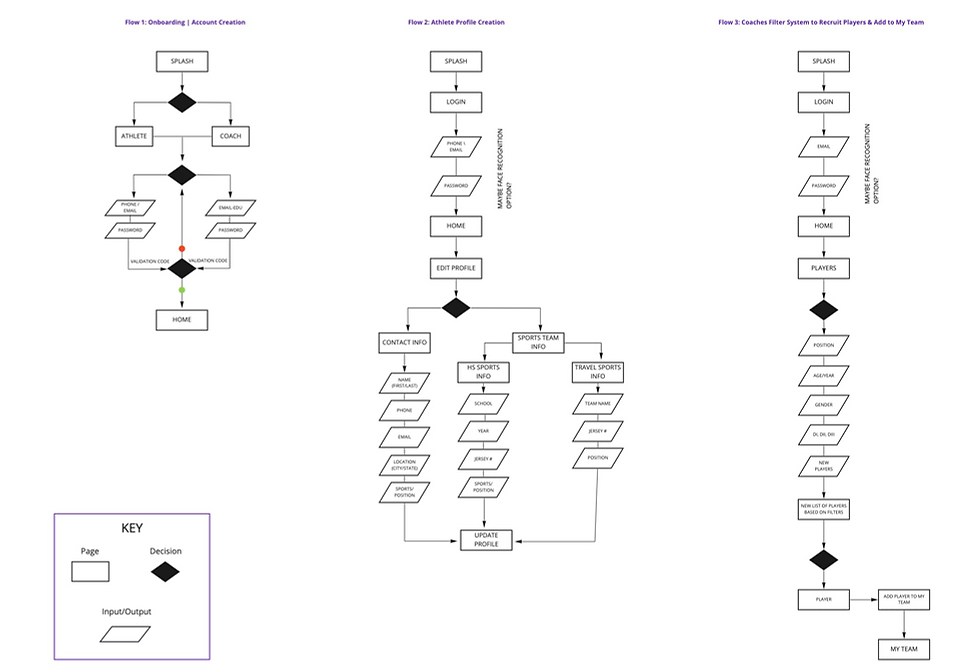
User Flows
I took the MVP’s and thought about how each screen would flow. Although I did not yet have any screenscompleted, I had to invision what that flow would look like from one screen to the next.
Sketches
After gathering the information needed, I sketched out each red route. The red routes are the critical tasks that deliver the most value to the users. There is a lot of forethought in this part of the design process. You have to keep in mind all the previous information and make sure you consider what is important for the user asopposed to what I think is the most critical.
Flow 1: Athlete Onboarding

Flow 2: Athlete Profile Updates

Flow 3: Coaches Filtering & Adding Players to Roster

Guerilla Testing
Once I completed the sketches, I put together a clickable prototype in Marvel to test with five participants. There were two immediate problems that the participants experienced.
-
Participants were confused with landing on the dashboard page after creating an account as an athlete.
-
Participants felt the onboarding process was very quick but anticipated more information would be required that would personalize their experience.
Before moving forward and creating wireframes, I had written down a few recommendations for changes.
-
There needs to be a longer and more informative onboarding process. Athletes should have the option to add more information than just an email and password.
-
Once the onboarding process is completed the first screen would stay as a dashboard/feed for both the athlete and coach. I would make sure that I add a name of the screen at the top so the user would know what screen they were on.
-
I would add a favorite button to the players on the coaches screens and the schools on the athletes screen. This would be an easy way for both athletes and coaches to keep track of players and school they were interested in.
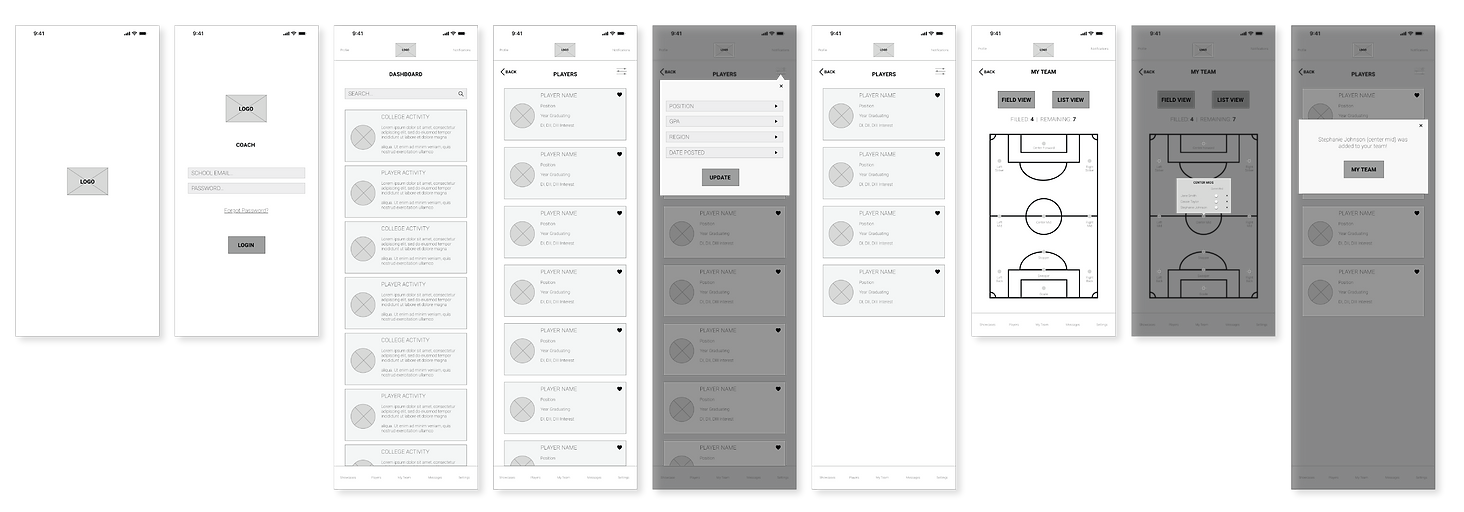
Wireframes
I took all of the information and feedback from the guerilla testing and created the wireframes.
Athlete Onboarding Wireframes

Athlete Profile Updates Wireframes

Coaches Filtering & Adding Players to Roster Wireframes
Wireflows
Once I created the low fidelity wireframes, I created wireflows, which allowed me to clearly indicate the clickable hotspots that would take users to the next step in the flow. This was where I really started to see this product come to life.
Flow 1: Athlete Onboarding

Flow 2: Athlete Profile Updates

Flow 3: Coaches Filtering & Adding Players to Roster

Product Identity
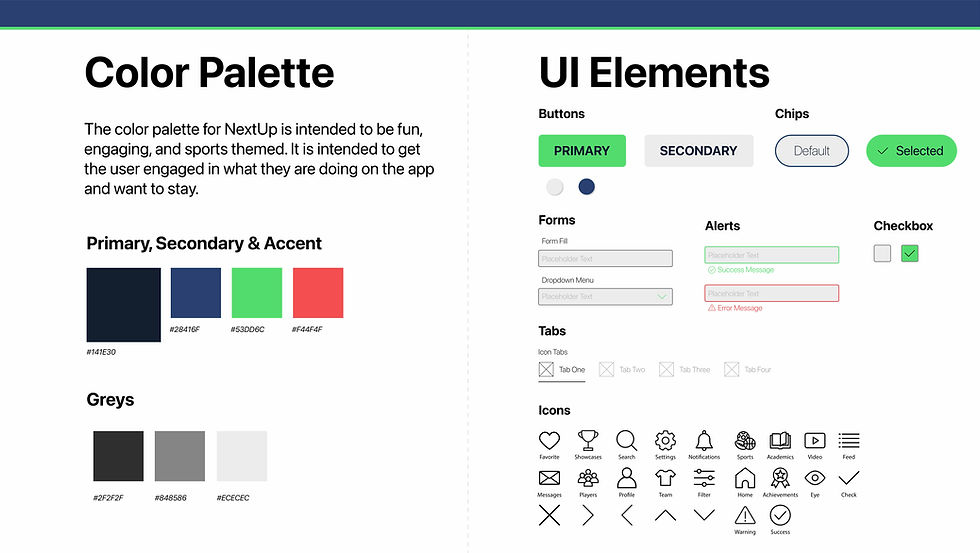
After I defined my problem and formulated my solution, I designed a brand platform and style guide. This included a logo with sizing and clear space guidelines, a color palette, fonts, samples of iconography and UI elements.



Prototype
Putting ideas into action
Athlete Onboarding
Athlete Profile Update
Coaches Filtering and Adding Players to Team
NextUp Main Features
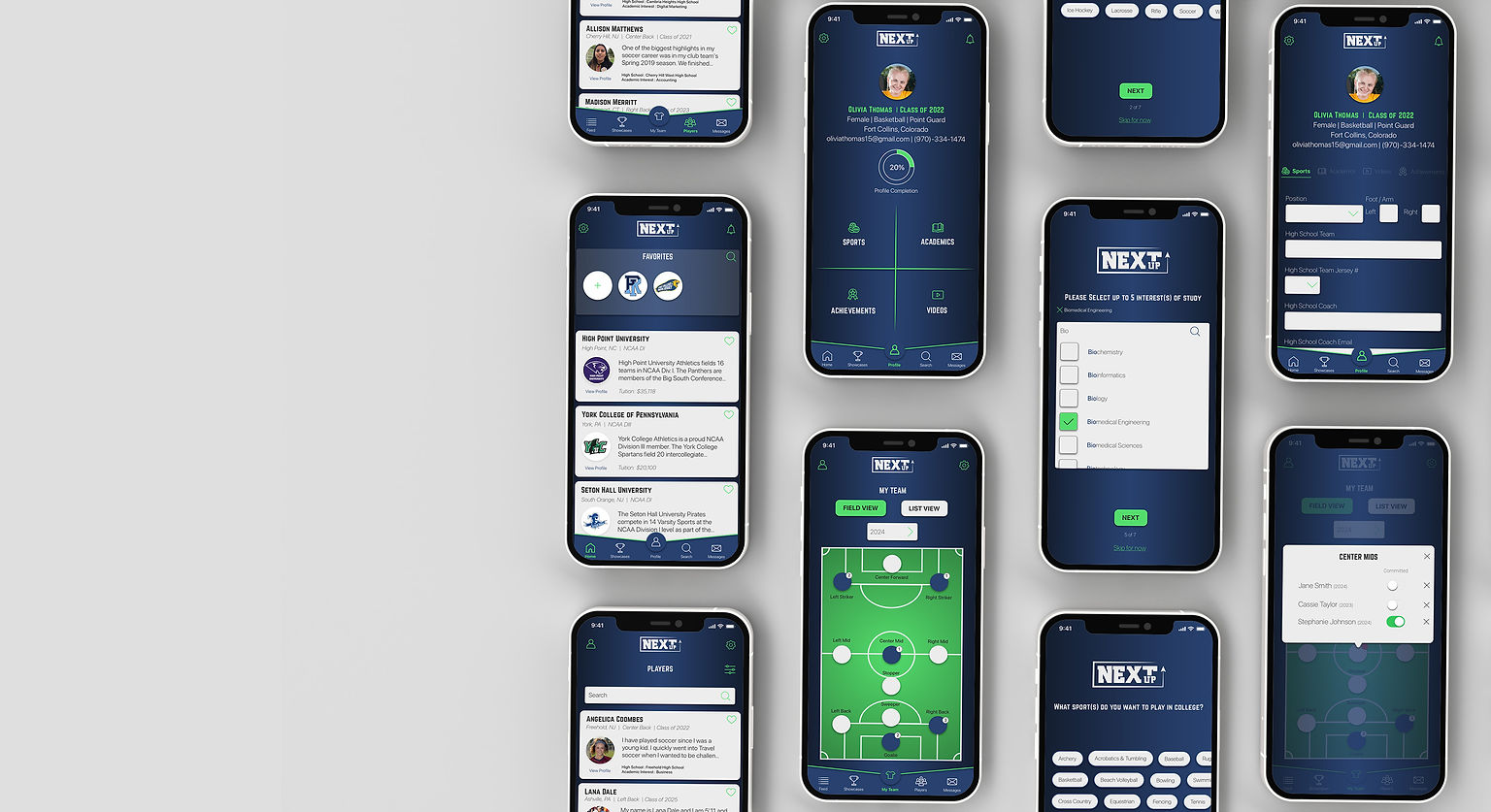
Favorite Schools
Athletes can find and add their top schools to their favorites list on the top of their feed.
Field View
Coaches can have a clear field view of who has committed and for what year.
Profile Updates
Athletes have easy access to update their profiles right in the palm of their hand.
Committed Players
Coaches can easily identify committed players for their teams.

Validate
Testing design with users
Usability Testing - Round 1
I conducted 5 usability tests remotely because of the global pandemic. I have access to a lot of people who are athletes and coaches because of my past with high school and college sports. Participants were given 4 tasks and worked through the prototypes created to work through those tasks. The tasks were moving through the onboarding process, profile updates, as well as filtering and adding players to coaches teams.

Usability Testing - Round 2
I made the above adjustments and went through another round of usability testing with 5 new participants. All the participants both athletes and non-athletes were able to move through the prototypes with ease and thought the process was fun and simple.
Key Takeaways
There is so much that goes into app and website design. The research, sketching, brainstorming, interviewing, testing, designing and so much more.
I never realized how much I appreciate and enjoy the entire process from start to finish. I learned that it is really important to interview the right people and to make sure you ask the right questions. It is all about the user. If something is a problem with more than one user than you know it is something to check on and tweak.
Even after this app was completed, there are still things that could be fixed. One big lesson I learned is, you willnever have a perfect app, it is helpful to experiment throughout the process and it is okay to need improvements.